How to Update Your Billing Information
To ensure uninterrupted service, please follow these steps to update your billing information on our site.
Step-by-Step Guide
1. Log In to Your Account
- Go to our website and enter your login credentials.
2. Navigate to the My Account Section
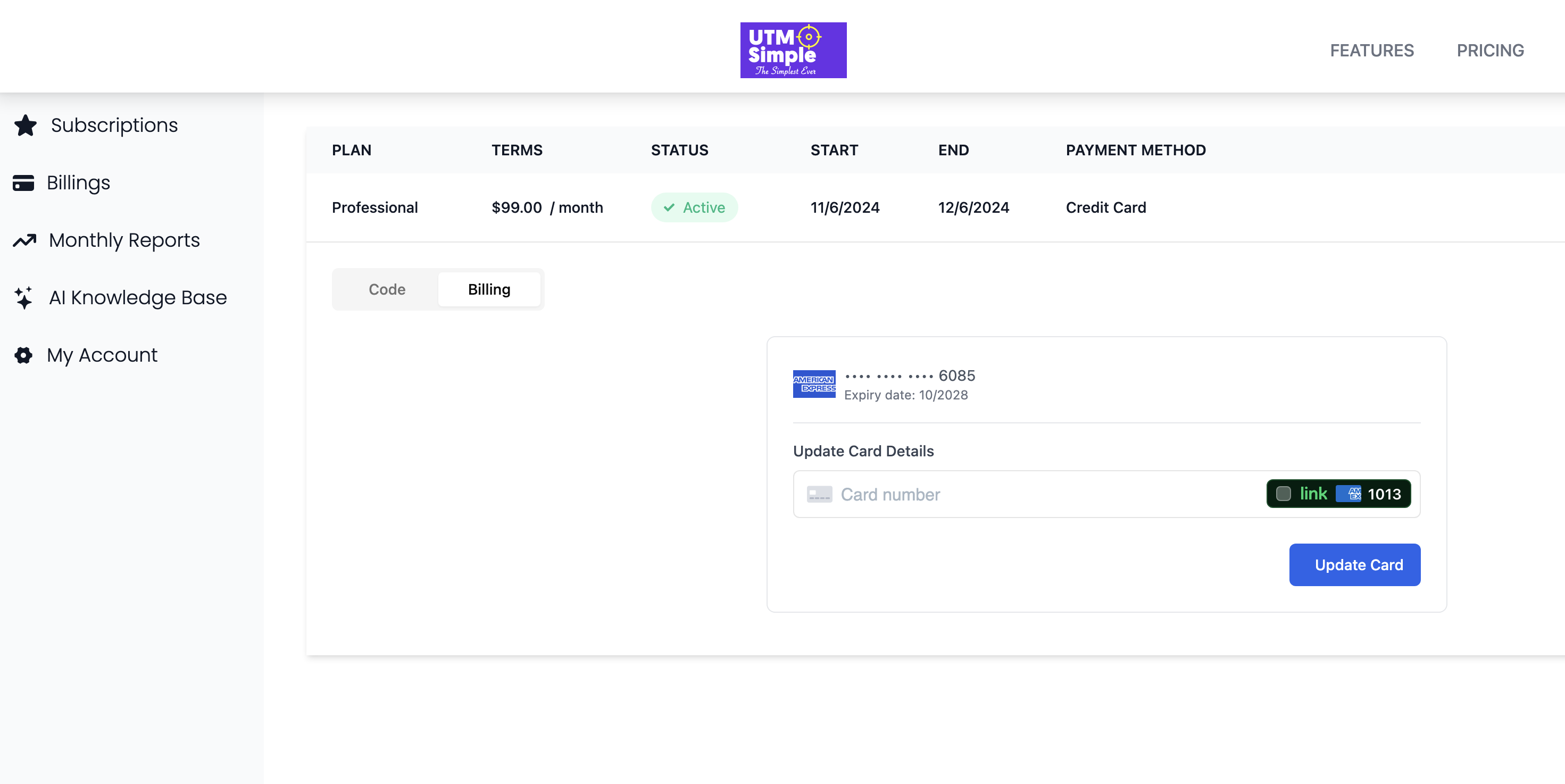
- Once logged in, find and click on "My Account" in the navigation menu on the left side of the page.
3. Access Your Subscription
- Under the "My Account" menu, click on "Subscriptions."
4. Select Your Subscription
- Locate and click on your active subscription. You will see details such as Plan, Terms, Status, etc.
5. Update Billing Information
- Click on the "Billing" tab next to "Code."
- You will see your current payment method and card details.
- Find the "Update Card Details" section.
6. Enter New Card Information
- Enter your new card number in the provided field.
- Ensure that all details are correct.
7. Save Your Changes
- Click the "Update Card" button to save your new billing information.
8. Confirmation
- You should receive a confirmation that your billing information has been updated successfully.
For any issues or further assistance, please contact our customer support team.